Frequently Asked Questions
Find answers to commonly asked questions about the RideMETRO Fare System.
Getting Started
The RideMETRO Fare Card is the new fare card that replaces the METRO Q® Fare Card, METRO Day Pass and METRO Money cards. When boarding a METRO vehicle or at a station platform, you can use the RideMETRO Fare Card to pay for your fare. The card looks like this: 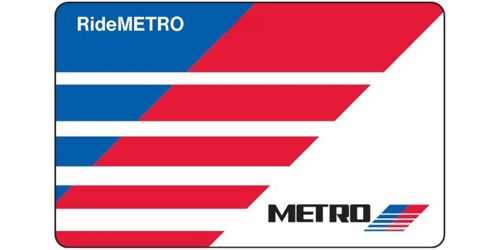
A RideMETRO Fare Card costs $2. After purchase, you can begin adding money onto the card for future travel. If you lose your card, you must purchase a new one.
It's recommended that you link your RideMETRO Fare Card to an account here in the METRO Online RideStore or in the RideMETRO app. This will enable you to manage your card and protect your balance in case the card is lost or stolen.
The RideMETRO app allows you to create a free virtual RideMETRO Fare Card or convert your physical card into a virtual one. Then, you can use the app’s QR code at the fare validators. If a physical card is converted to a virtual card, it can no longer be used. RideMETRO Discount Fare Cards issued to people with disabilities, METROLift Cards and TMC Cards should not be converted into virtual cards.
No, but creating an account has its advantages. With an account, you can:
- Protect your card balance in case your card is lost or stolen
- Access your account using the METRO Online RideStore or the RideMETRO app
- Set up automatic reloading of funds
- View your transaction history
- Monitor your progress towards receiving one free trip for every 10 paid trips
- Manage multiple physical RideMETRO Fare Cards*
*Cards can only be assigned to one account at a time. Your account will have one card set for paying fares, but you can link as many physical cards as you need. This is helpful for parents or caretakers who want to add money to a dependent’s or client’s card. It also makes it easy to report lost or stolen cards. The account holder manages the card, but the physical card stays with the individual(s) to use.
After creating your account, you'll receive an email with a link to verify your email address. You must verify your email address within 24 hours before you can access your account online or through the RideMETRO app. If the link has expired, you can request a new verification email.
If you don't receive the email in your inbox, check your junk mail folder. If you still don't see it, contact customer service at 713-635-4000 and a representative can activate for you.
RideMETRO Fare Card
You can obtain a RideMETRO Fare Card for $2 and load money on it at any of the following:
- Here in the METRO Online RideStore
- METRO RideStore locations
- Participating retailers
- Ticket Vending Machines (TVMs)
You can add money to your RideMETRO Fare Card here in the METRO Online RideStore or in the RideMETRO app using a credit or debit card (Visa, Mastercard, American Express or Discover). You can make a one-time payment or schedule automatic reloads, allowing you to choose how much and how often money is added to your card.
At participating retail locations*, Ticket Vending Machines (TVMs), and METRO RideStores, you can use any of the following payment methods to make a one-time payment:
- Credit or debit card (Visa, Mastercard, American Express or Discover)
- Cash
- Apple Pay (credit/debit cards stored in Apple Wallet)
- Google Pay (credit/debit cards stored in Google Wallet)
*Some locations will only provide reloading of existing cards.
The minimum reload amount is $3, whether you load funds online or in person.
If you’re adding money to more than one RideMETRO Fare Card using the same credit or debit card, please wait at least five minutes between each transaction. Some banks may decline back-to-back charges made too quickly as a security measure to prevent fraud.
Your account balance will appear on the fare validator after you’ve tapped to pay or transfer. You can also check it by:
- Visiting the METRO Online RideStore
- Using the RideMETRO app
- Visiting any METRO RideStore location
- Using a Ticket Vending Machine (TVM)
- Calling METRO Customer Service
RideMETRO App
With the new RideMETRO fare system, you can now log in to the app to manage your RideMETRO account, including any linked RideMETRO Fare Cards. If you create a virtual RideMETRO Fare Card, you can use the app’s QR code to pay your fare.
The app also allows you to easily plan and manage your trip on Local bus, Park & Ride bus and METRORail. You can locate nearby routes and access estimated, real-time vehicle arrivals.
Additionally, there are links to view current Service Alerts, contact Customer Service and reach the METRO Police Department (MPD) to report suspicious activity.
Just create a virtual RideMETRO Fare Card inside the app and add at least $3 to get started.
Tap the QR code symbol in the upper right corner of your app screen.

Scan the QR code approximately six inches below the validator found on METRORail platforms and onboard METRO vehicles.
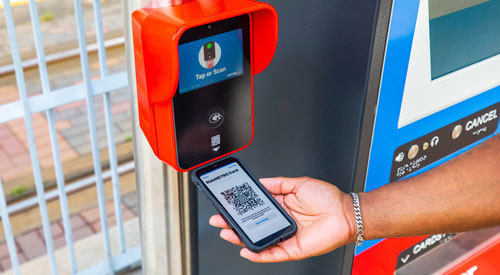
You can download the RideMETRO app from your phone using the buttons below:


Or scan the QR code below using your phone:

If you have the RideMETRO app on your phone, your app will either automatically update or you’ll be asked to update your app to the latest version.
Fares
For the following services, the regular fare to board is $1.25 and the discounted fare is 60 cents:
- Local bus
- METRORail
- METRO curb2curb
For METRO Park & Ride commuter express bus service, the regular fare to board ranges from $2 to $4.50, depending on your location. The discounted fare is half price.
If you fit one of the categories below, you may be eligible for a discounted fare to ride at half price, pending approval by METRO:
- K-12 students
- College/university/trade school students
- Seniors 65-69
- Non-METROLift customers with a disability
If you fit one of the categories below, you may be eligible for a discounted fare to ride FREE, pending approval by METRO:
- Seniors 70+
- Qualified veterans
Proof of eligibility must be provided when applying for a discounted fare.
You can apply here in the METRO Online RideStore. We recommend creating an account before applying and purchasing a card. Once approved, your card will be shipped to the address you provided and appear in your online account, where you can then manage the card.
You can visit a METRO RideStore location. If approved, the RideStore will provide you with a RideMETRO Discount Fare Card or convert your existing RideMETRO Fare Card into a virtual card.
Payment When Boarding
You'll need to tap or scan the fare validator as you enter a METRO local bus, Park & Ride bus or curb2curb vehicle.
The following payment methods will need to be tapped on the fare validator:
- Physical RideMETRO Fare Card
- Credit or debit card (Visa, Mastercard, American Express or Discover)
- Apple Pay (using stored credit/debit cards)
- Google Pay (using stored credit/debit cards)
The following payment methods will require you to scan a QR code approximately six inches under the fare validator:
- Virtual RideMETRO Fare Card (inside the RideMETRO app)
- 3-Hour Pass ticket with QR code (not valid on Park & Ride service)*
- Day Pass ticket with QR code (not valid on Park & Ride service)*
On local bus and Park & Ride bus, you can also pay with cash by depositing it into a fare box at the front of the vehicle as you board. When using cash, no change is given, and free transfers aren't included.
Payment methods marked by an asterisk (*) may be purchased from a Ticket Vending Machine (TVM) on METRORail platforms and can be used to transfer to local bus and METRO curb2curb service.
You'll need to tap or scan the fare validator as you enter a METRORail platform.
The following payment methods will need to be tapped on the fare validator:
- Physical RideMETRO Fare Card
- Credit or debit card (Visa, Mastercard, American Express or Discover)
- Apple Pay (using stored credit/debit cards)
- Google Pay (using stored credit/debit cards)
The following payment methods will require you to scan a QR code approximately six inches under the fare validator:
- Virtual RideMETRO Fare Card (inside the RideMETRO app)
- 3-Hour Pass ticket (not valid on Park & Ride)*
- Day Pass ticket (not valid on Park &Ride)*
Fare inspectors may need to verify that you've paid and will ask you to tap or scan the payment method you used at the platform fare validator. If you've already paid, you won't be charged again.
Payment methods marked by an asterisk (*) may be purchased from a Ticket Vending Machine (TVM) on METRORail platforms and can be used to transfer to local bus or METRO curb2curb service. TVMs accept the following:
- Cash
- Credit or debit card (Visa, Mastercard, American Express, Discover)
- Apple Pay (using stored credit/debit cards)
- Google Pay (using stored credit/debit cards)
No. Each rider must tap or scan their own form of payment. You cannot pay for multiple people’s fares with the same payment method.
Transfers
Once you pay your fare using any non-cash payment method, you’ll be entitled to free transfers between any METRO service of equal or lesser value for up to three hours.
The transfer policy applies to the following services:
- Local bus
- Park & Ride bus
- METRORail
- METRO curb2curb
When transferring, make sure to tap or scan the same payment method you used at the start of your trip. For example, if you tapped a physical debit card to begin your trip, you must use that same physical card when transferring within three hours. A physical credit or debit card is not the same as a virtual version of the same card stored in Apple Wallet or Google Wallet - they're treated as two different payment methods.
For transfers to a service with a higher cost, you only pay the fare difference for up to three hours.
You cannot use a Day Pass on your RideMETRO Fare Card to ride Park & Ride bus service.
Cash transactions don't qualify for free transfers to any METRO service.
Yes. Passes include a time-stamped QR code that you can scan on any fare validator to receive free transfers in any direction for up to three hours on the following services:
- Local bus
- METRORail
- METRO curb2curb
You won't be able to transfer to Park & Ride bus service using a Ticket Vending Machine (TVM) pass.
If your trip includes a Park & Ride bus service, and you plan to purchase your fare at a Ticket Vending Machine (TVM), we recommend purchasing a RideMETRO Fare Card from the machine and loading enough money on it to cover the total cost of your trip. The card will entitle you to transfer to Park & Ride bus service and only pay the fare difference for up to three hours. You shouldn't load a Day Pass on your card if you plan to take a Park & Ride bus. Day passes are not valid on Park & Ride bus service.
Yes. Whenever you board a new vehicle or enter a station platform, tap or scan your original payment method at the fare validator. You won't necessarily be charged every time you tap, but it confirms your fare and serves as proof of payment.
Retailers and RideStores
You can access the most current list of participating retail locations on the Find a Store page.
You can access the complete list of METRO RideStore locations on the METRO RideStores page.
Maps, schedules and other METRO information are available at any METRO RideStore location.
Participating retail locations only carry RideMETRO Fare Cards.
Other
All sales are final. Refunds will only be issued if charged incorrectly or if you didn't receive the correct change from a Ticket Vending Machine (TVM).
For unused balances on your account, the funds can be transferred to other RideMETRO accounts.
You can view credit, debit or prepaid card payment history by visiting the Payment History page.
You’ll need to enter your credit, debit or prepaid card number, expiration date and CVV code.
Still Need Help?
Please contact METRO through our public comment form.
You can also contact our customer call center at 713-635-4000. Hours are Mon-Fri, 5 a.m.-10 p.m. and Sat-Sun, 8 a.m.- 5 p.m.